Using an MCP Server with LangGraph: A Practical Guide to MCP Adapters
Introduction
As LLM agents grow more complex, prompt-only tool calling starts to break down.
Hallucinated tools, inconsistent outputs, and fragile prompt logic make production agents hard to trust. This becomes especially painful once agents move beyond single-step reasoning into stateful, multi-node workflows.
That’s where MCP (Model Context Protocol) comes in.
In this article, I’ll walk through how to use an MCP server with LangGraph using MCP adapters, why this approach produces cleaner and more deterministic agents, and what actually worked in a real implementation.
This is not a theoretical overview. It’s a practical guide based on hands-on integration.
The Problem with Traditional Tool Calling
Before MCP, most LangGraph agents relied on a mix of:
- Prompt instructions like “You MUST call this tool”
- Manual tool routing logic
- Post-processing messy outputs
- Hoping the model doesn’t invent tools
In practice, this leads to:
- Inconsistent tool usage
- Agents ignoring required tools
- Difficult debugging
- Tight coupling between prompts and execution logic
As agent graphs become stateful and multi-step, this approach does not scale. Prompt-driven enforcement is fundamentally unreliable.
What Is an MCP Server (In Practice)?
An MCP server acts as a formal contract layer between your agent and its tools.
Instead of embedding tool definitions inside prompts:
- Tools are declared and hosted by the MCP server
- The agent discovers tools dynamically
- Inputs and outputs are schema-validated
- The model cannot guess tool behavior
A useful mental model is:
MCP is like OpenAPI for AI agents, designed specifically for multi-tool, multi-step reasoning.
This shifts tool usage from “best effort” to “protocol-enforced”.
Why MCP Adapters Matter in LangGraph
LangGraph is excellent at:
- Stateful agent flows
- Deterministic graph execution
- Multi-node reasoning
However, it intentionally does not dictate how tools should be exposed or enforced.
MCP adapters fill this gap.
With MCP adapters:
- LangGraph does not care how tools are implemented
- The agent only interacts with validated MCP tools
- Tool calls become protocol-driven, not prompt-driven
The result is cleaner graphs and far more predictable behavior.
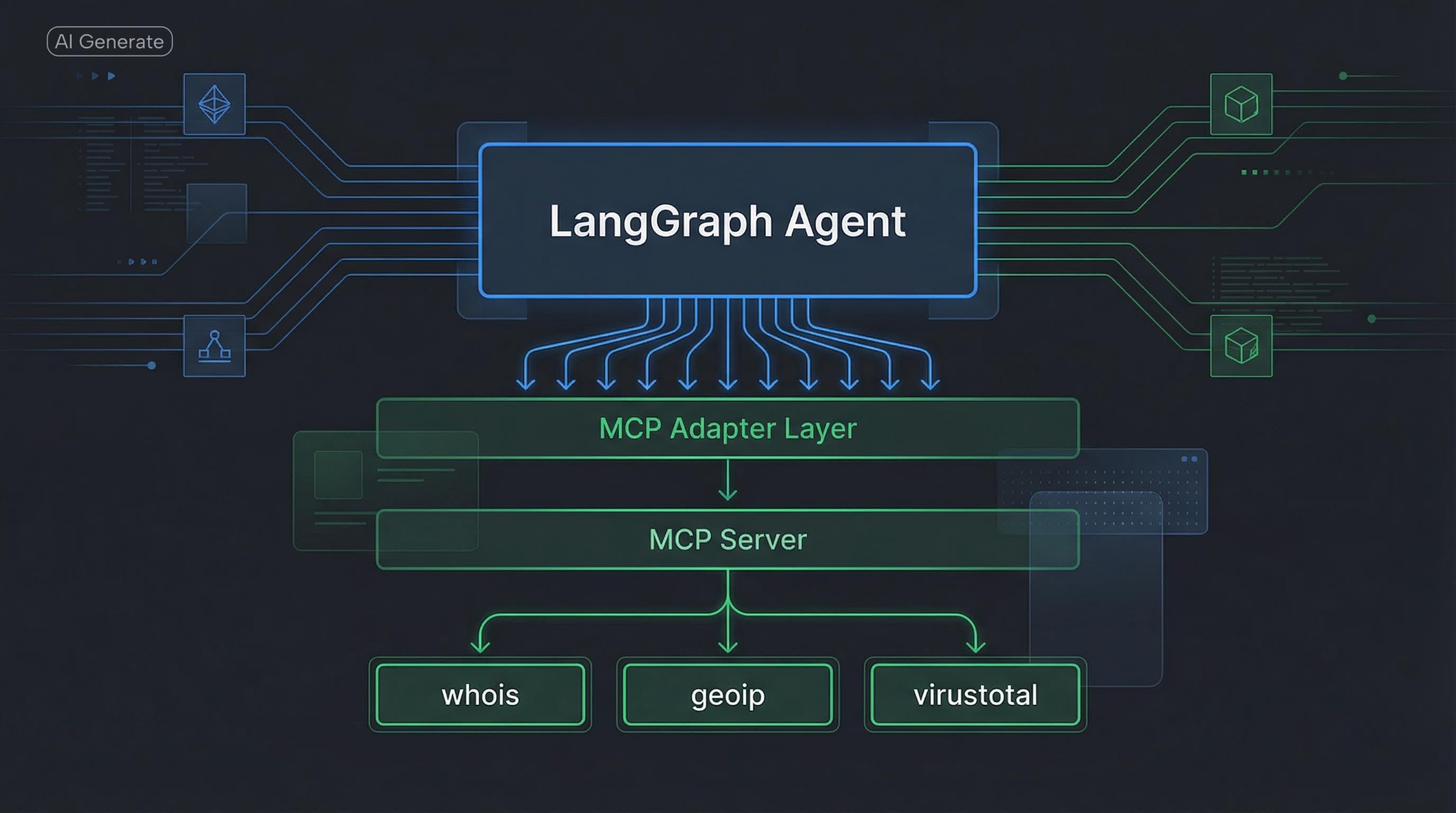
High-Level Architecture
This mental model worked best in practice:
LLM Agent (LangGraph)
        ↓
   MCP Adapter Layer
        ↓
     MCP Server
        ↓
  External Tools / Services
Clear separation of concerns:
- LangGraph handles reasoning and state
- MCP defines tool contracts
- Tools handle real execution
Each layer has a single responsibility, which dramatically reduces complexity.
Step 1: Running an MCP Server
Your MCP server exposes tools using strict schemas.
Example tools:
- whois_info
- geoip_info
- virustotal_info
Each tool:
- Has defined input arguments
- Returns structured output
- Is discoverable at runtime
This immediately eliminates:
- Tool hallucination
- Argument mismatch
- Output inconsistency
The MCP server becomes the authoritative source of truth for all available capabilities.
Step 2: Connecting MCP to LangGraph via Adapters
Using MCP adapters, LangGraph loads tools directly from the MCP server.
Conceptually, this looks like:
tools = await client.get_tools(server_name="sentinel")

agent = create_agent(
    model=model,
    tools=tools,
    system_prompt=SYSTEM_PROMPT,
)
Important details:
- LangGraph does not hardcode tools
- The MCP server defines what the agent can do
- Tool schemas are enforced automatically
This removes an entire class of runtime failures caused by mismatched prompts and tool definitions.
Step 3: Writing a Tool-Enforced System Prompt
With MCP in place, the system prompt becomes protocol-aware instead of defensive.
Example:
You are a SOC analyst assistant.

You MUST:
- Call whois_info
- Call geoip_info
- Call virustotal_info

Use ONLY tool outputs.
Do NOT invent facts.
Because the tools are MCP-backed:
- The agent cannot bypass them
- Outputs are always structured
- Downstream parsing becomes trivial
The prompt is no longer fighting the model. It is reinforcing a protocol the model already understands.
What Improved Immediately
After switching to MCP adapters, the improvements were obvious.
Deterministic Tool Usage
The agent always calls required tools. No retries, no prompt hacks, no brittle guardrails.
Clean Outputs
No mixed natural language and tool artifacts. Everything is structured and predictable.
Easier Debugging
Failures occur at the protocol level, not as vague “LLM behavior” issues.
Scalable Agent Design
Adding new tools does not require rewriting prompts or graph logic. The MCP server handles discovery and validation.
When You Should Use MCP with LangGraph
This setup is ideal if you are building:
- SOC or SecOps agents
- RFQ or procurement agents
- Interview or assessment agents
- Multi-step enterprise workflows
- Any agent where incorrect tool usage has real consequences
If your agent must be correct, explainable, and auditable, MCP is not optional.
Final Thoughts
LangGraph gives you control over agent flow.
MCP gives you control over agent capabilities.
Together, they solve the two hardest problems in agent engineering:
- What should the agent do next?
- What is the agent allowed to do?
If you are serious about production-grade AI agents, MCP servers combined with LangGraph adapters are one of the cleanest and most robust patterns available today.
Get more dev insights
Join other developers getting community updates, new articles, and real-world learnings. No spam.
Written by
TermTrix
Building learning-driven tech communities at TermTrix. Writing about modern web development, system design, and developer tooling.