Building a Simple AI Agent Using FastAPI, LangGraph, and MCP
Modern AI agents are no longer just single LLM calls. Real-world agents need tool access, memory, workflow control, and clean APIs. In this post, we will build a simple but production-ready AI agent using FastAPI, LangGraph, and MCP (Model Context Protocol).
This article is written for backend engineers who want a clear mental model and a practical implementation.
Tech Stack Overview
We will use the following components:
- FastAPI as the API layer
- FastMCP as the tool and prompt server (Model Context Protocol)
- LangGraph for agent workflow orchestration
- LangChain MCP adapters to connect MCP tools to LangGraph
By the end, the agent will be able to:
- Call external tools such as Wikipedia and REST Countries
- Load system prompts dynamically from MCP
- Execute a LangGraph-based agent workflow via a FastAPI endpoint
High-Level Architecture
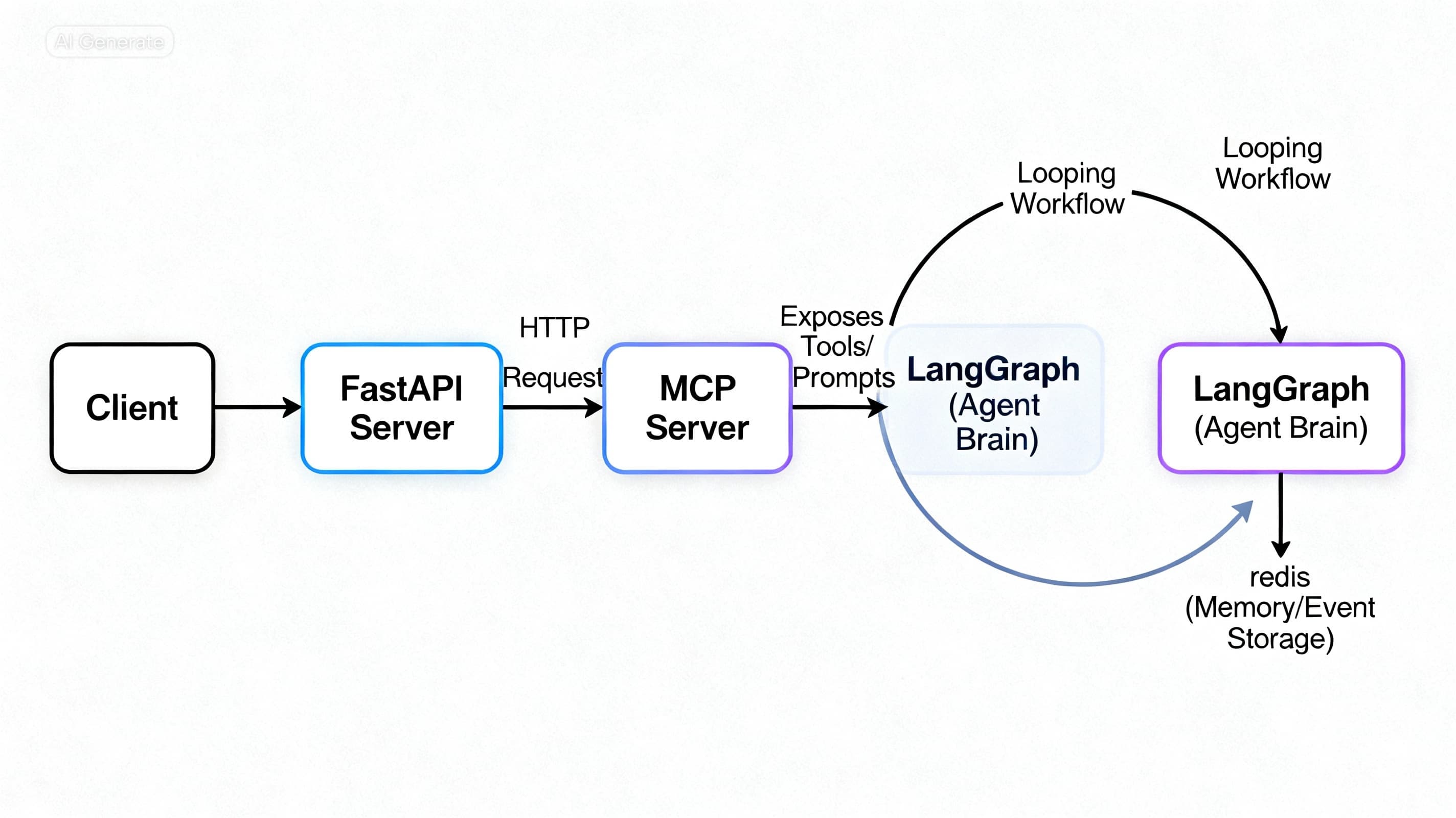
The architecture is intentionally modular.
Client | | POST /workflow v FastAPI | | MCP Client (HTTP) v FastMCP Server | | Tools Prompts | LangGraph Agent
Key Design Idea
- MCP acts as the tool and prompt server
- LangGraph acts as the agent brain
- FastAPI exposes the agent as a clean HTTP API
This separation keeps the system maintainable and scalable.
Step 1: FastAPI as the Agent Gateway
FastAPI is used as the entry point for client requests. It mounts the MCP server and exposes a workflow endpoint.
from fastapi import FastAPI
from mcp_server.server import mcp_app
from workflows.graph import create_graph
from langchain_mcp_adapters.client import MultiServerMCPClient

app = FastAPI(lifespan=mcp_app.lifespan)
app.mount("/agent", mcp_app)
Mounting MCP allows FastAPI to host both the agent API and the MCP server in the same process.
MCP Client Configuration
FastAPI communicates with MCP through an HTTP-based MCP client.
client = MultiServerMCPClient({
    "agent": {
        "transport": "http",
        "url": "http://localhost:8000/agent/mcp",
    },
})
This client is responsible for discovering tools and prompts at runtime.
Step 2: Workflow Endpoint
The workflow endpoint performs three responsibilities:
-
Opens an MCP session
-
Builds the LangGraph agent
-
Executes the agent with user input
@app.post("/workflow") async def run_workflow(message: str): config = {"configurable": {"thread_id": "001"}}
  async with client.session("agent") as session:
      agent = await create_graph(session=session)
      response = await agent.ainvoke(
          {"messages": message},
          config=config
      )

      return response["messages"][-1].content
Why thread_id Matters
The thread_id enables conversation memory and checkpointing inside LangGraph. Without it, each request would be stateless.
Step 3: Defining MCP Tools with FastMCP
FastMCP allows tools to be defined using decorators. These tools are automatically discoverable by LangGraph.
Wikipedia Tool
@mcp.tool(
    name="global_news",
    description="Get global news from Wikipedia"
)
async def global_news(query: str):
    return wikipedia.summary(query)
Country Details Tool
@mcp.tool(
    name="get_countries_details",
    description="Get details of a country"
)
async def get_countries_details(country_name: str):
    async with httpx.AsyncClient(timeout=15.0) as client:
        response = await client.get(
            f"https://restcountries.com/v3.1/name/{country_name}?fullText=true"
        )
        response.raise_for_status()
        return response.json()
Currency Tool
@mcp.tool(
    name="get_currency",
    description="Get details of a currency"
)
async def get_currency(currency_code: str):
    async with httpx.AsyncClient(timeout=15.0) as client:
        response = await client.get(
            f"https://restcountries.com/v3.1/currency/{currency_code}"
        )
        response.raise_for_status()
        return response.json()
These tools are exposed through MCP and can be invoked by the LLM through LangGraph.
Step 4: MCP Prompts for System Instructions
Instead of embedding system prompts inside agent code, MCP manages them centrally.
@mcp.prompt
async def common_prompt() -> str:
    return """
    You are a helpful assistant.
    Answer the question based on the tools provided.
    """
This approach enables:
- Centralized prompt management
- Runtime updates without redeploying agents
- Shared prompts across multiple agents
Step 5: MCP Server with Redis Event Store
To persist events and conversation history, we use Redis as the event store.
from fastmcp.server.event_store import EventStore
from key_value.aio.stores.redis import RedisStore

redis_store = RedisStore(url="redis://localhost:6379")

event_store = EventStore(
    storage=redis_store,
    max_events_per_stream=100,
    ttl=3600,
)
Creating the MCP App
def create_app():
    register_tools(mcp)
    register_prompts(mcp)
    return mcp.http_app(
        event_store=event_store,
        path="/mcp"
    )

mcp_app = create_app()
This setup ensures tools, prompts, and memory are all managed by MCP.
Step 6: LangGraph Agent Construction
LangGraph is responsible for orchestrating the agent logic.
Loading MCP Tools and Prompts
tools = await load_mcp_tools(session)
system_prompt = await load_mcp_prompt(
    session=session,
    name="common_prompt"
)
Prompt Template
prompt_template = ChatPromptTemplate.from_messages([
    ("system", system_prompt[0].content),
    MessagesPlaceholder("messages")
])
Binding Tools to the LLM
llm_with_tool = llm.bind_tools(tools)
chat_llm = prompt_template | llm_with_tool
This setup allows the LLM to decide when to call tools.
Step 7: LangGraph Workflow Definition
The workflow defines how the agent loops between reasoning and tool execution.
graph = StateGraph(EnrichmentState)

graph.add_node("chat_node", chat_node)
graph.add_node("tool_node", ToolNode(tools=tools))

graph.add_edge(START, "chat_node")
graph.add_conditional_edges(
    "chat_node",
    tools_condition,
    {"tools": "tool_node", "__end__": END}
)
graph.add_edge("tool_node", "chat_node")

graph = graph.compile(checkpointer=MemorySaver())
How the Agent Loop Works
- The chat node lets the LLM reason
- If a tool is required, execution moves to the tool node
- Tool results are fed back to the LLM
- The loop ends when no further tools are needed
This is a true agent loop, not a single-shot LLM call.
Final Result
At the end of this setup, you have:
- A FastAPI-powered agent API
- An MCP-based tool and prompt server
- LangGraph-driven workflow orchestration
- Redis-backed memory and event storage
- A clean separation between API, tools, prompts, and agent logic
This architecture scales well as agents grow more complex and is suitable for real production workloads.
Get more dev insights
Join other developers getting community updates, new articles, and real-world learnings. No spam.
Written by
TermTrix
Building learning-driven tech communities at TermTrix. Writing about modern web development, system design, and developer tooling.